Case study / Banking / Web app

ALMA VALID BPR

A collateral analysis app for a BPR. Staff record each debtor and asset, calculate its value, and get a coverage verdict in one report, with data and analysis adapted to the bank's daily operations.

Collateral valuationCost approachCoverage ratio
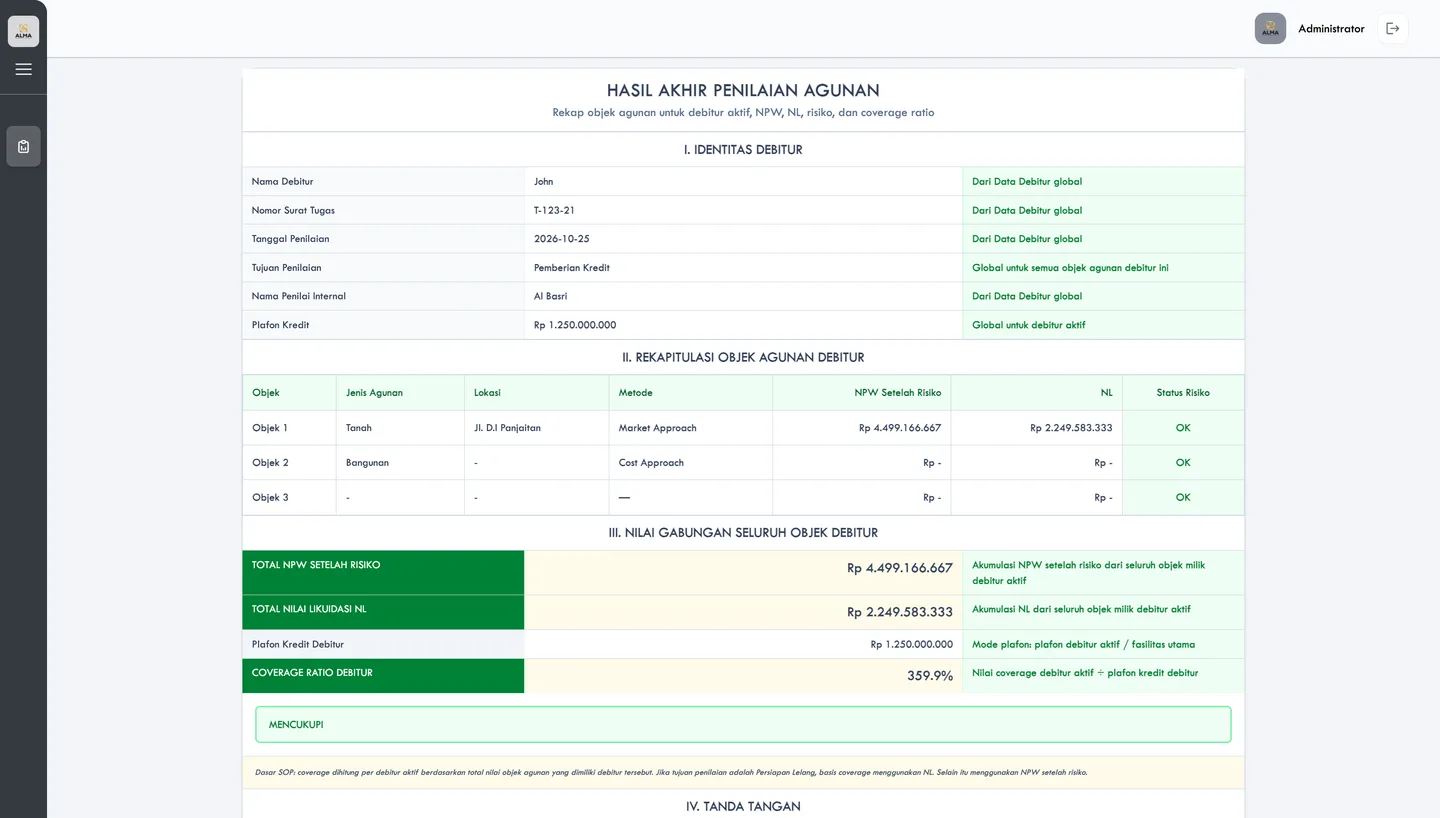
ALMA VALID BPR final collateral assessment: debtor identity, collateral objects with NPW and liquidation value, totals and a coverage ratio verdict

Product

ALMA VALID

Industry

Banking · BPR

Edition

BPR (rural bank)

Services

UI/UX design, Web application development, Financial system development

Platform

Web

01 / The problem

Where it started

A BPR values collateral by its own rules.

Before a BPR grants credit, its staff value the assets behind the loan. One debtor can pledge several assets, and each asset needs its own method, its own condition check and its own legal document.

ALMA VALID BPR keeps the debtor, the assets, the calculation and the report in one application, adapted to how the bank works day to day.

What success had to look like

Collateral analysis that fits a BPR.

  • 01

    Collateral data managed in one system, per debtor.

  • 02

    Calculations that follow the bank's valuation rules.

  • 03

    Valuation analysis without a separate spreadsheet.

  • 04

    An assessment report ready for the credit decision.

02 / The process

Adapted to how a BPR works.

Four steps, from the bank's operations to a working application.

Phase 01

Learn the operations

We mapped the BPR's collateral process and operational needs.

Phase 02

Adapt the workflow

Screens and calculations shaped to the BPR's valuation rules.

Phase 03

Build the application

Data management, calculation, valuation analysis and reporting.

Phase 04

Launch and support

Rollout, with support after go-live.

03 / What we built

Five screens of one assessment.

From the debtor list to the final coverage verdict.

01 / Collateral data management

A history of every debtor.

The dashboard lists each debtor with the assignment letter number, date, purpose, credit limit and number of assets. Staff search by name, letter or purpose, then edit or delete a record.

  • Search by name, letter number or purpose
  • Credit limit and asset count per debtor
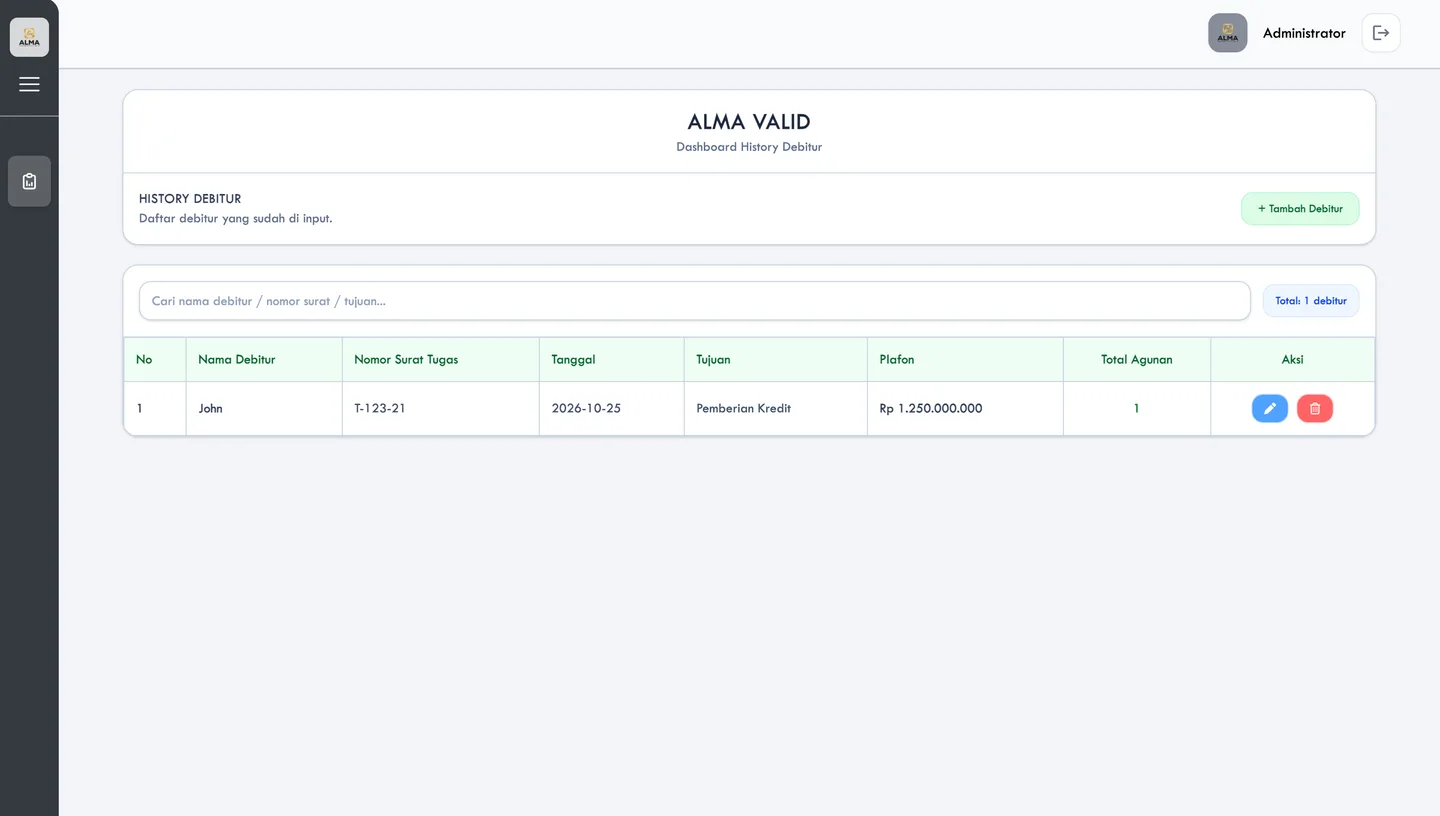
Debtor history dashboard with search, assignment letter number, date, purpose, credit limit and number of collateral objects

02 / Debtor and object data

Entered once, used for every object.

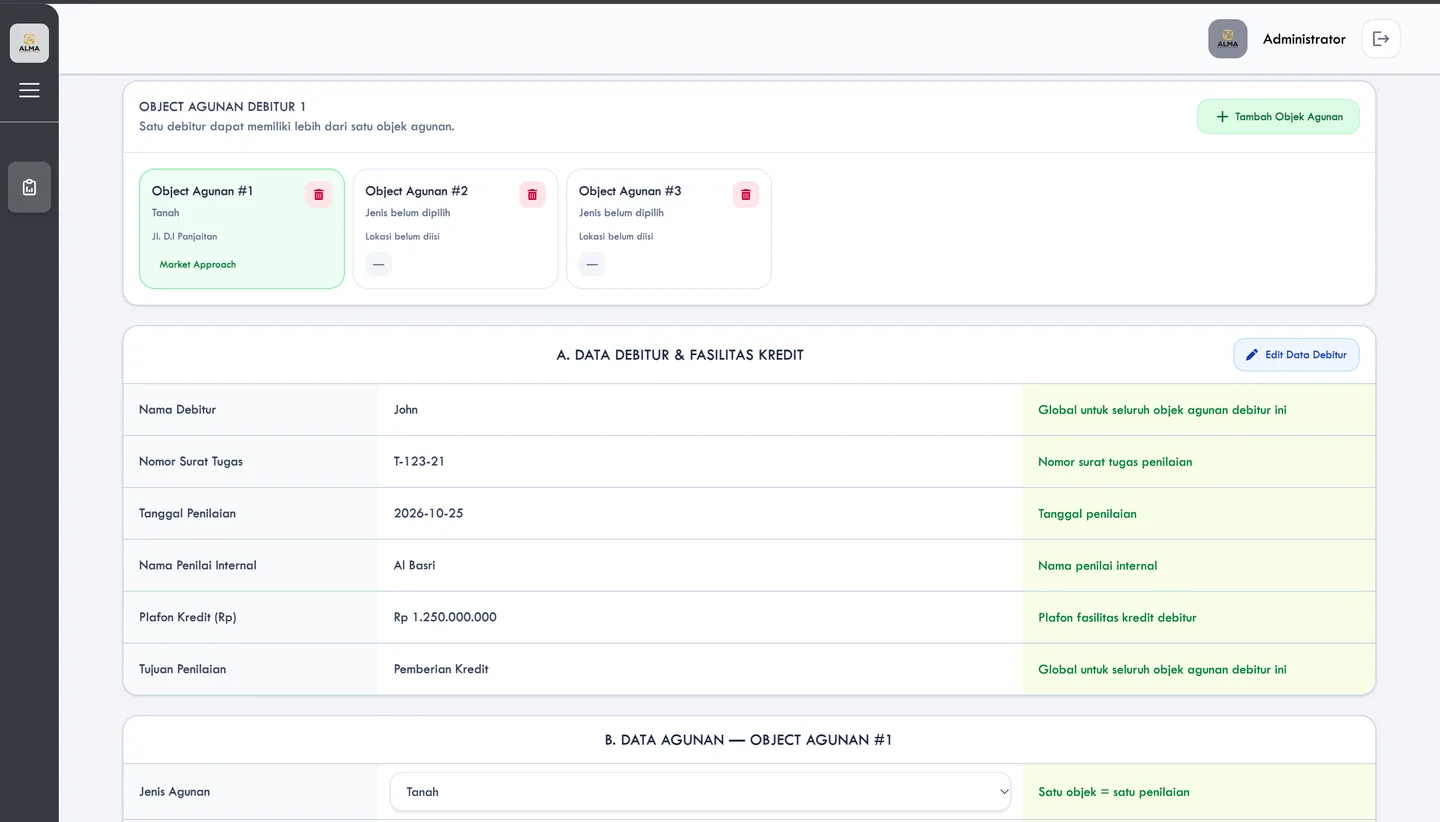
One debtor can hold several collateral objects, shown as cards with the type, location and valuation method. Debtor and credit facility data apply to all of them, and a help column explains each field.

  • Global debtor data, per-object asset data
  • Add or remove objects per debtor
Collateral object cards and the debtor and credit facility form with a help column

03 / Collateral calculation

The cost approach, step by step.

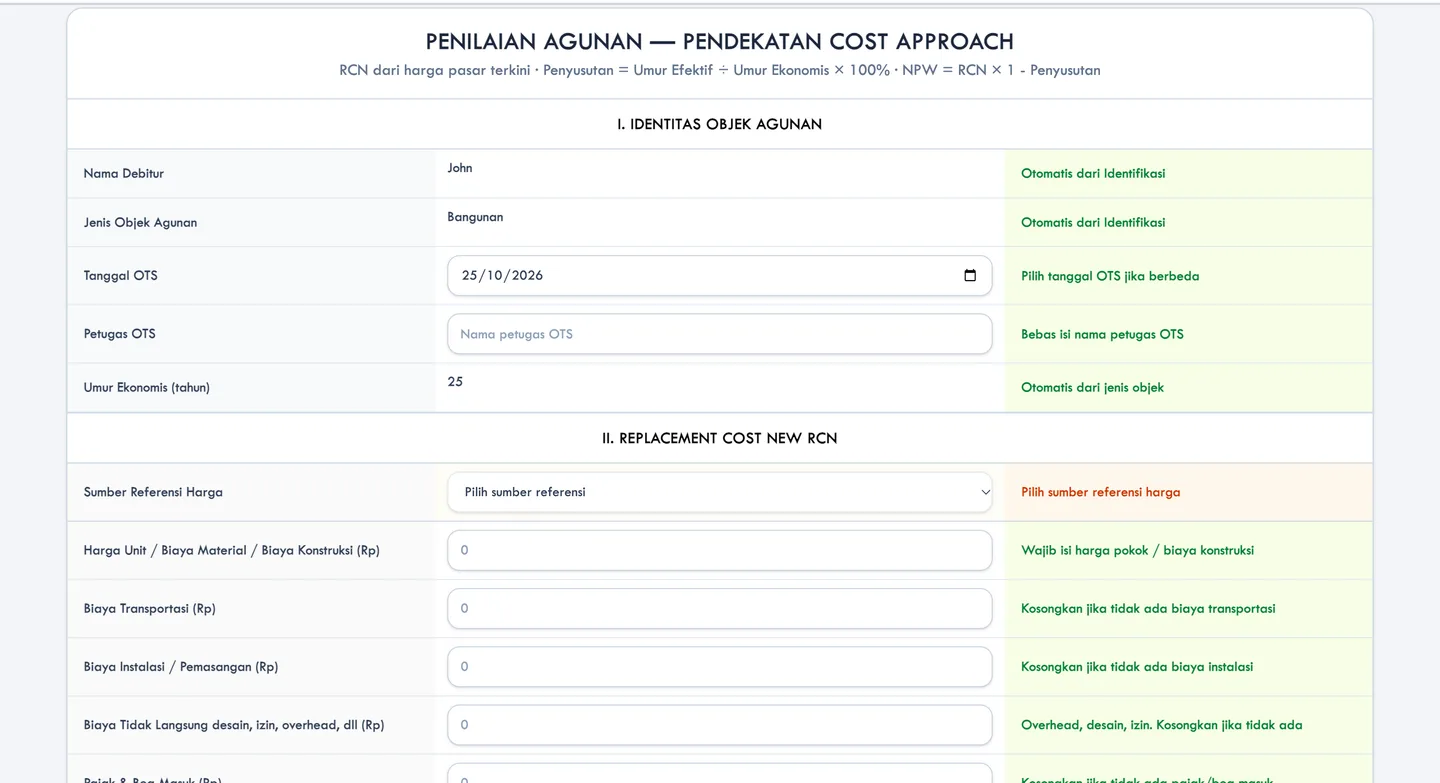
For a building, the form takes the on-the-spot (OTS) survey data, the reference for prices and the construction costs. It then works out the replacement cost new (RCN), with the formula for the final value shown in the header.

  • Economic life filled from the object type
  • Reference source chosen for the price
Cost approach form with object identity and replacement cost fields

04 / Valuation analysis

Condition decides the depreciation.

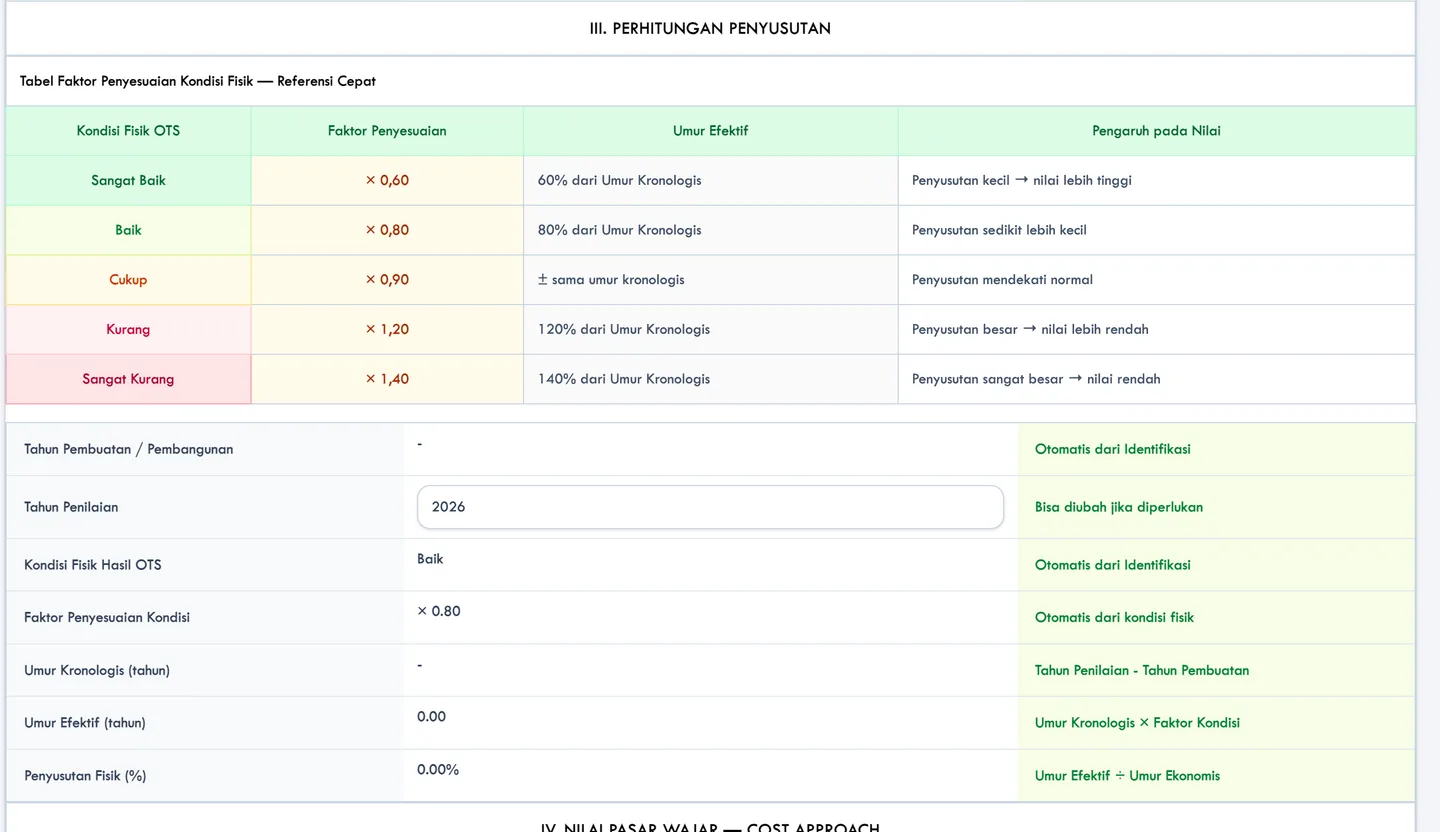
A quick reference table links the physical condition found on site to an adjustment factor, from very good (×0.60) to very poor (×1.40). The app turns that into effective age and a physical depreciation percentage.

  • Five condition levels, one factor each
  • Depreciation calculated from effective age
Depreciation tab with a condition factor table and effective age and physical depreciation fields

05 / Assessment reporting

One verdict per debtor.

The final report lists every object with its method, NPW after risk and liquidation value (NL), adds them up, and divides by the credit limit. The coverage ratio ends in a plain verdict, and a note states which value the SOP uses as the basis.

  • Totals across all objects
  • Basis follows the purpose of valuation
Final assessment report with debtor identity, object summary, totals and coverage ratio

Screens come from the application with sample debtors, assets and figures. The amounts and verdicts shown are illustrations, not the bank's real data.

04 / Results

Valuation as one digital record.

Data, calculation, analysis and the decision, in one place.

Data

No retyping per asset.

BeforeDebtor details repeated for each asset.

NowEntered once per debtor, shared by all of its objects.

Calculation

Rules applied for you.

BeforeCosts and depreciation worked out by hand.

NowThe form fills the economic life and the condition factor, then calculates the rest.

Analysis

Value without a spreadsheet.

NowNPW and liquidation value come out of the same application.

Decision

A verdict the reviewer can read.

NowEach report ends with whether the collateral covers the credit limit.

Next project / Financial analysis application

ALMA PINTAR

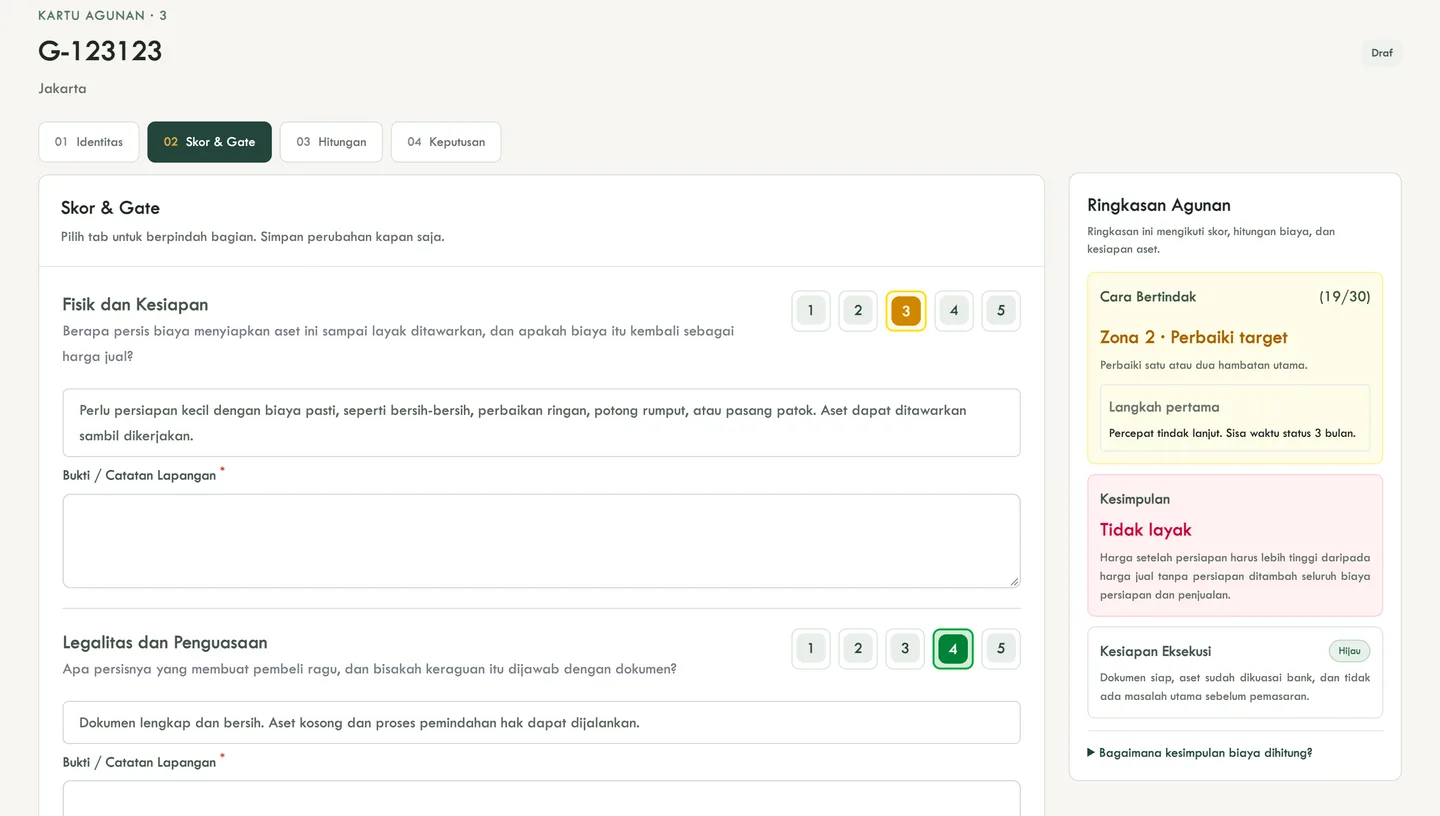
A portfolio app for repossessed bank collateral. It scores how well each asset will sell, counts the cost of preparing it, and says whether the bank should act.

Open project
ALMA PINTAR score and gate tab: six marketability scores from 1 to 5, a result panel showing Zone 2, and a feasibility verdict

Your buildcould benext.

Start

Reply within one business day